 Postozo
A social media scheduler in Hindi
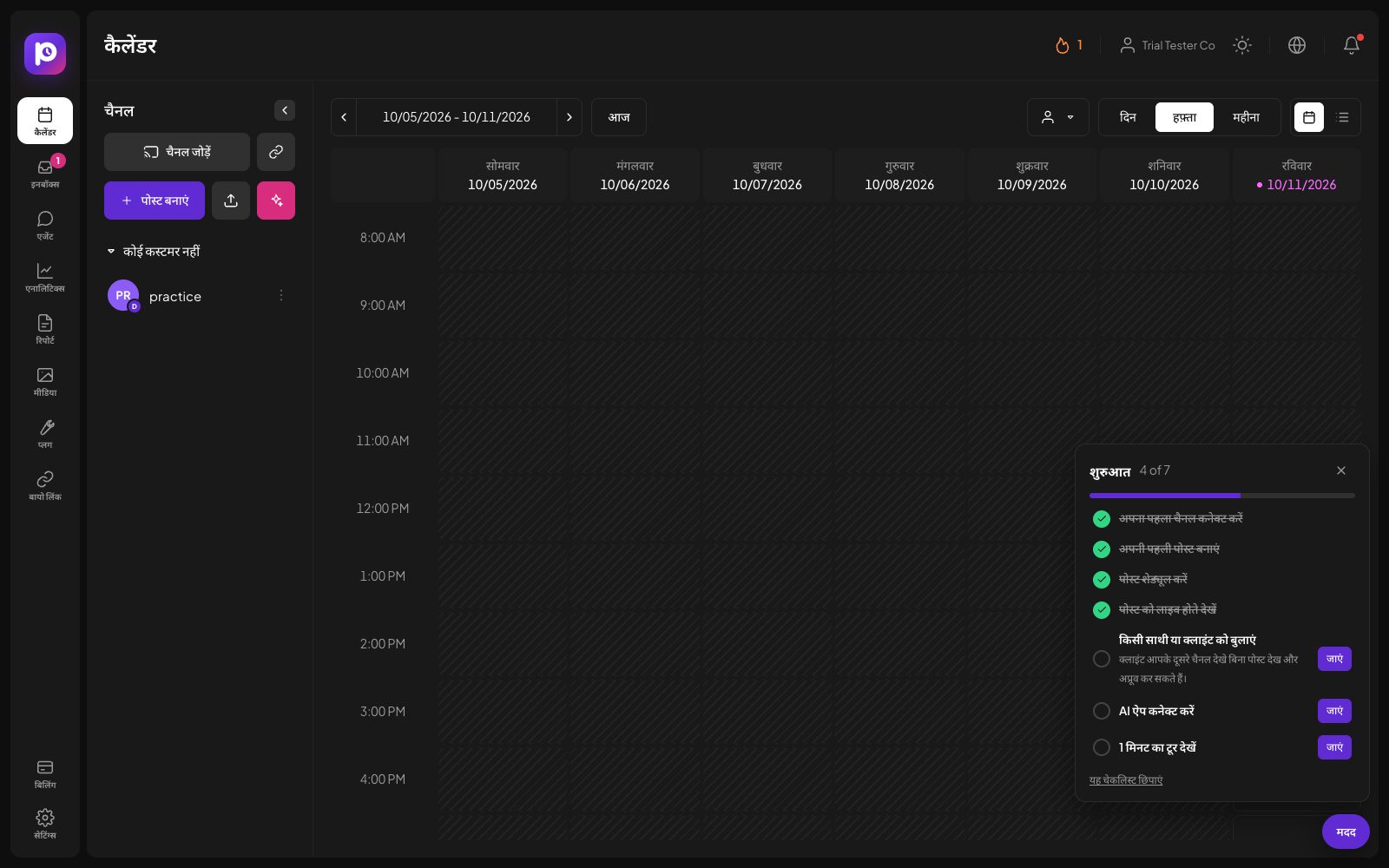
Switch the whole app to Hindi from the globe button. Menus, buttons and help texts change; your posts, comments and names stay exactly as they were written.
What you can do
Hindi everywhere you work
The menu, calendar, post editor, inbox, reports, settings and help texts.
Your words stay yours
Posts, comments, names and anything you type are never changed.
Follows you
Your choice is saved in your account, so a new phone or computer opens in Hindi too.
Each person picks
One teammate can use Hindi while another uses English, in the same workspace.
Clear Devanagari
A font made for Devanagari is used for Hindi text, next to the normal font for English words.
AI that writes in Hindi
The AI assistant can write and translate posts into Hindi and 23 other languages.
Switch Postozo to Hindi in 4 steps
Open the language menu
Click the globe button in the top bar.
Pick Hindi
Choose हिन्दी (Hindi). The app reloads in Hindi.
Work as usual
Everything works the same way. Brand and network names stay in English letters, so they match what you see on the networks.
Switch back any time
Pick English in the same menu. The choice is saved in your account.
Example: a family business in Indore
A sweet shop in Indore is run by 2 brothers. The younger one is happy in English, the older one prefers Hindi. Both sign in to the same workspace. The older brother picks Hindi, so the calendar, the approval buttons and the inbox read in Hindi on his phone, while the posts themselves stay in the Hinglish the shop always uses. His brother keeps English. They work on the same posts without changing each other's settings.
What is translated, and what is not
The app's own words are translated: the menu, buttons, labels, help texts, empty screens, confirmations, short messages after an action, and the settings. Numbers stay in Western digits, the same way most Hindi apps and banks show them. Brand and network names, like Instagram or Google Business Profile, stay in English letters so they match the networks.
What people write is never touched. Post text, comments in the inbox, client names, channel names and anything you type keep their own language. A few texts that come from the server, like some error details and network rules, the admin area, emails and public pages (link in bio and client reports) are in English for now.
Writing posts in Hindi
The language of the app and the language of your posts are separate. You can use the app in English and post in Hindi, or the other way round. The AI assistant writes new posts in the language set in your brand voice, and Translate turns a post into Hindi or 23 other languages while keeping links, mentions and hashtags as they are. The post editor shows the character count for each channel as you write.
How the setting is stored
Your language is saved on the device you use and in your account. When you sign in on a new phone or computer, Postozo opens in the language from your account. The Hindi words are loaded only when you pick Hindi, so the app stays as fast as before for people who use English.
Limits and rules
| App languages | English and Hindi |
| Post languages | Any language on every network |
| AI translation | 24 languages, including Hindi |
| Setting | Per person, saved in the account |
| Still in English | Server messages, admin area, emails, link in bio and report pages |
Common words in the Hindi app
A few of the words you will see, taken from the same Hindi word list the app uses:
| English | Hindi |
|---|---|
| Calendar | कैलेंडर |
| Create Post | पोस्ट बनाएं |
| Inbox | इनबॉक्स |
| Analytics | एनालिटिक्स |
| Reports | रिपोर्ट |
| Media | मीडिया |
| Settings | सेटिंग्स |
| Billing | बिलिंग |
| Approve | अप्रूव करें |
| Request changes | बदलाव मांगें |
| Draft | ड्राफ्ट |
| Scheduled | शेड्यूल हो गई |
| Published | पब्लिश हो गई |
| Post now | अभी पोस्ट करें |
| Add to Calendar | कैलेंडर में जोड़ें |
| Customers | कस्टमर |
| Team members | टीम के सदस्य |
| Notifications | सूचनाएं |
The full list has 2,037 entries.
Tips to get more from it
- Keep brand and network names in English letters in your posts, the same way the app shows them, so people can search for them.
- Use the AI Translate button for a first draft in Hindi, then read it once before you post.
- If a word in the app reads oddly, tell us at support@postozo.com. Good translations come from real use.
Words on this page, explained
| Interface language | The language of the app's own menus and buttons. |
| Post language | The language you write your posts in, which can be any language. |
Mistakes to avoid
- Expecting the setting to translate your posts. Use Translate in the AI menu instead, and check the result.
- Changing the language for a whole team. Each person picks their own; tell your team where the globe button is.
- Writing hashtags in a mix of scripts. Pick 1 script per hashtag so people searching for it find your post.
Who it is for
- Business owners who think in Hindi run their social media without fighting English menus. See Small business.
- Agencies give Hindi speaking clients and staff an app in their language. See Agencies.
- Creators who post in Hindi get an app that speaks it too. See Creators.
Plans and limits
Every language is in every plan, for every person in the workspace. See Pricing for every limit.
| Limit | Standard | Team | Pro | Ultimate |
|---|---|---|---|---|
| App in English or Hindi | Yes | Yes | Yes | Yes |
| AI writing and translation in 24 languages | Yes | Yes | Yes | Yes |
Works with these channels
Languages works on every connected channel. These are the ones people use it with most:
See all channels, or compare Postozo with other tools on the compare page.
Questions
Will Postozo change my posts into Hindi?
No. The language setting only changes the app's own words. To translate a post, use Translate in the AI menu of the post editor and check the result before you accept it.
Which parts are still in English?
Messages that come from the server, such as some error details and network rules, the admin area, emails, and public pages like link in bio and client reports.
Does each person choose their own language?
Yes. The setting is per person, saved in their account.
Will more languages come?
English and Hindi are available today. New languages are listed in the changelog when they are added.
Is there a social media management tool in Hindi?
Yes. Postozo can be used in Hindi: menus, buttons, help texts and messages in the app.
Can I write posts in Hindi?
Yes, in any language, on every network. The language of the app and the language of your posts are separate.
Does Hindi work on the phone app?
Yes. The installed app follows the language saved in your account.
Related features
AI assistant
Write a post from a short idea, improve it, translate it or fit it to each network. You see every suggestion before it changes your post.
Read moreMobile app
Install Postozo from the browser on Android, iPhone, Windows or Mac. It opens full screen like an app and sends a push message when a post fails, needs approval or a client connects an account.
Read morePost editor
The post editor sends 1 text to all the channels you pick. Change the text, pictures or settings for a single channel without touching the others.
Read moreTeam and roles
Invite your team and clients to 1 workspace. Each role sees and does only what it should.
Read moreStart planning your posts today
Create your account and publish your first post in 5 minutes.
Create your free account