 Postozo
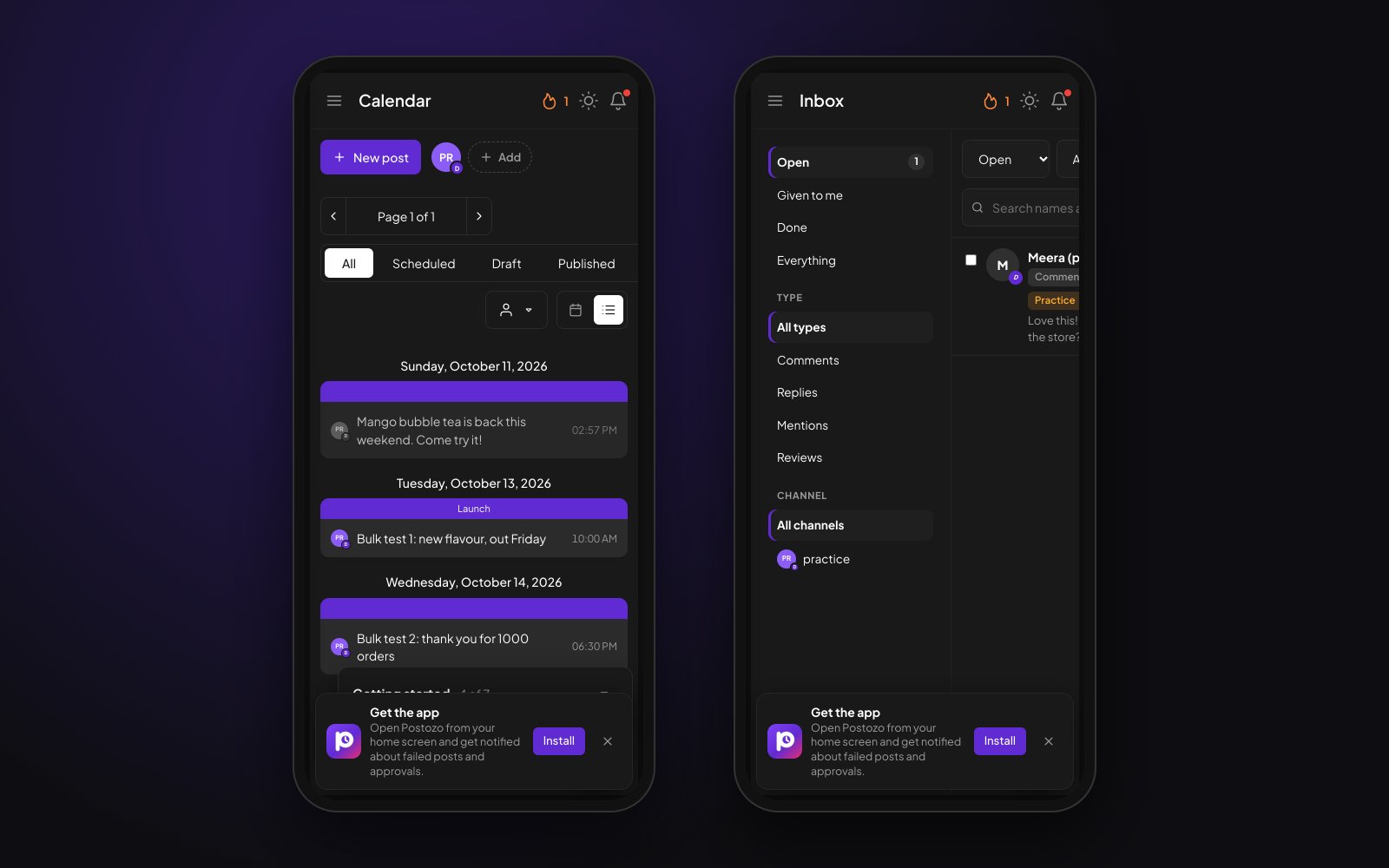
Postozo on your phone, with notifications
Install Postozo from the browser on Android, iPhone, Windows or Mac. It opens full screen like an app and sends a push message when a post fails, needs approval or a client connects an account.
What you can do
Install in 2 taps
Android and desktop browsers offer Install; on iPhone and iPad you add it to the home screen from Safari.
Full screen
It opens from its own icon in its own window, without the browser bar.
Push notifications
Failed posts, posts that need approval, clients who connect an account, finished bulk uploads and reports.
Made for small screens
New post, your channels and Add channel sit at the top of the calendar; dialogs open as bottom sheets.
Always up to date
There is nothing to update. You get each new version the moment we release it.
Your brand for clients
On a white label address, the installed app carries your agency name and logo.
Install the Postozo app in 4 steps
Open Postozo on your phone
Go to app.postozo.com in Chrome on Android or Safari on iPhone, and sign in.
Install it
On Android, tap Install when the browser offers it, or use the browser menu. On iPhone, tap Share, then Add to Home Screen.
Turn on notifications
Open the app from its icon, then Help, Notifications on this device, and allow them. Each device is turned on separately.
Use it like any app
Create posts, approve, answer the inbox and check the calendar. A short message tells you when you are offline.
Example: an approval on the way to work
An agency owner has Postozo on her Android phone with notifications on. At 08:10 a push message says a client's post needs approval before its 09:00 slot. She taps it, the post opens, she fixes a typo in the price and approves it from the bus. At 09:00 it goes out. That evening a push message says a post failed on LinkedIn because the connection expired; she reconnects the channel from her phone and presses Retry.
Why an installable app and not a store app
An installable web app, often called a PWA, runs the same code as the full Postozo in your browser. That means every feature, from the calendar to the inbox and client reports, is on your phone on the day it ships. There is no separate app to wait for, no store review between a fix and you, and nothing to update. It installs with an icon, opens full screen and sends push messages like other apps.
Postozo is not in the App Store or Google Play today. If your company only allows apps from a store, use Postozo in the phone's browser instead; it works the same.
How push notifications work
Notifications go through the push service of your browser or phone: Google for Chrome and Android, Apple for Safari, iPhone and iPad, and Mozilla for Firefox. Postozo only sends to those services, and the message is encrypted on our server so only your device can read it. Each device is turned on separately, so you choose which phone or computer may interrupt you. If the push service says a device is gone, for example because the app was removed, or sending fails 5 times in a row, that device is taken off the list by itself.
What changes on a small screen
On phones, the top of the calendar has a strip with New post, your channels and Add channel, because the channel list beside the calendar would not fit. Short dialogs open as bottom sheets at their own height, so they are easy to reach with a thumb. Large ones, like the post editor and Add channel, use the full screen. The inbox shows the list first and opens each item full width with a Back button.
Limits and rules
| Android | Chrome, Edge and other Chromium browsers: Install from the browser |
| iPhone and iPad | Safari, Share, Add to Home Screen; push needs iOS or iPadOS 16.4 or later |
| Computers | Chrome and Edge on Windows, Mac, Linux and ChromeOS |
| App stores | Not listed in the App Store or Google Play |
| Devices per person | As many as you like; notifications are turned on per device |
Install steps by device
| Device | How to install |
|---|---|
| Android phone or tablet | Open app.postozo.com in Chrome, tap Install when it is offered, or the 3 dots menu, then Install app |
| iPhone or iPad | Open app.postozo.com in Safari, tap Share, then Add to Home Screen, then Add |
| Windows, Mac, Linux, ChromeOS | Open app.postozo.com in Chrome or Edge, then the install icon in the address bar, or the browser menu |
Inside Postozo, Help has "Install the app on your phone" with the steps for the device you are on.
Tips to get more from it
- Turn on notifications on the phone you carry, and leave them off on shared computers.
- Install it on your computer too. It opens in its own window and is easy to find next to your other apps.
- If notifications stop on an iPhone, open Postozo from its home screen icon once. Safari tabs do not get push messages.
Words on this page, explained
| Installable web app | A website that installs like an app, with its own icon and window. Also called a PWA. |
| Push notification | A message from an app that shows on your device even when the app is closed. |
Mistakes to avoid
- Turning on notifications in a Safari tab on iPhone. Add Postozo to the home screen first, then open it from the icon.
- Blocking notifications when the browser first asks. You then have to allow them again in the browser or phone settings.
- Installing on a shared computer and staying signed in. Sign out from Settings when you leave.
Who it is for
- Agency owners approve posts and answer clients from anywhere. See Agencies.
- Creators post and check comments from the phone they film on. See Creators.
- Shop owners reply to reviews between customers. See Small business.
How other tools handle mobile app
Of the 12 social media tools we compare, 12 list mobile app on their own pricing, feature or help pages:
- Postiz: Official Android app on Google Play. The iPhone client listed on the App Store (Postio) is a separate app.
- Buffer: included
- Hootsuite: included
- Later: included
- Sprout Social: included
- Metricool: included
- SocialPilot: included
- Publer: included
- Sendible: Sendible describes its mobile apps mainly for push-notification posting.
- Vista Social: included
- Planable: included
- Agorapulse: included
Plans and limits
The installable app and push notifications are in every plan, on as many devices as you like. See Pricing for every limit.
| Limit | Standard | Team | Pro | Ultimate |
|---|---|---|---|---|
| Install on phones and computers | Yes | Yes | Yes | Yes |
| Push notifications | Yes | Yes | Yes | Yes |
| Your brand on the installed app | No | No | Yes | Yes |
Works with these channels
Mobile app works on every connected channel. These are the ones people use it with most:
See all channels, or compare Postozo with other tools on the compare page.
Questions
Is Postozo in the App Store or Google Play?
No. You install it from the browser instead. It works the same way: an icon on your home screen, full screen, and push messages.
Do notifications work on iPhone?
Yes, on iOS and iPadOS 16.4 or later, once Postozo is added to the home screen and opened from its icon.
Which notifications do I get?
A post failed, a post needs approval, a client connected an account, a bulk upload or a report is done, a low Google review, and items given to you in the inbox.
Can I turn notifications off?
Yes. Turn them off for 1 device in Help, Notifications on this device, or in your phone settings.
Is there a social media scheduling app without a store download?
Yes. Postozo installs from the browser on Android, iPhone, Windows and Mac, with no app store needed.
Does it work offline?
You need a connection to schedule and publish. When you are offline, Postozo says so instead of showing an error page.
Can I use it on a tablet?
Yes. iPad and Android tablets install it the same way as phones.
Related features
Social inbox
Comments, replies, mentions and Google reviews from your channels land in 1 list. Reply, like, give an item to a teammate or mark it done, without opening each network.
Read moreClient approval
Turn on approval for a customer and every post for them waits for a yes. Clients approve, ask for changes or comment from a simple review link.
Read moreCalendar
See every scheduled, published and draft post in 1 place. Switch between day, week, month and list, and drag a post to move it.
Read moreReliability
Postozo was built to fix the 2 things people hate most in schedulers: posts that fail without a reason, and posts that go out twice.
Read moreStart planning your posts today
Create your account and publish your first post in 5 minutes.
Create your free account