 Postozo
Post to multiple social media accounts at once, then fit each one
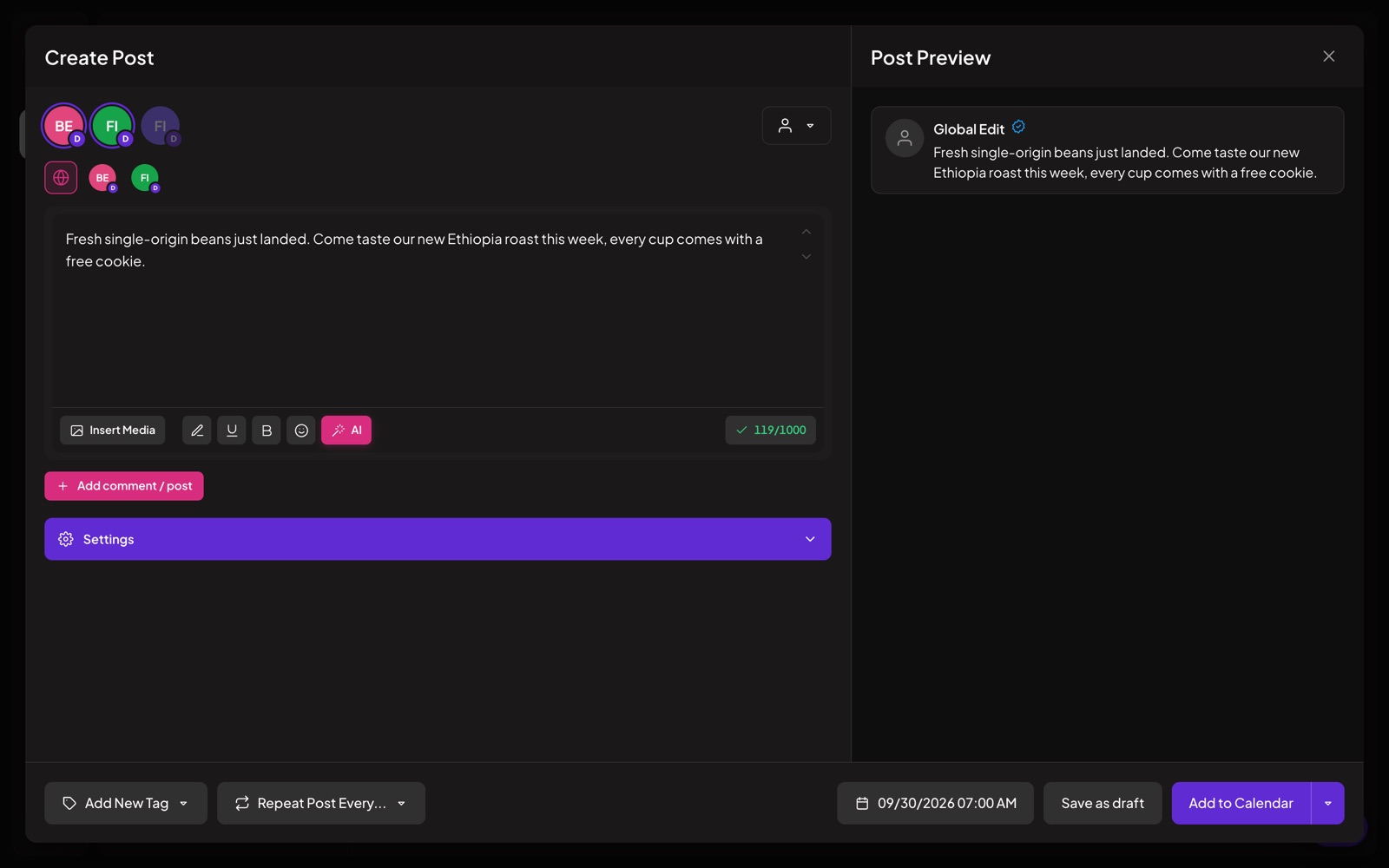
The post editor sends 1 text to all the channels you pick. Change the text, pictures or settings for a single channel without touching the others.
What you can do
Main text plus channel text
Write the main post once. Open a channel to give it its own version, for example a shorter post for X.
Live preview
See how the post will look on the network while you write.
Checks before you save
Postozo checks each channel's limits, like character counts, required pictures and required settings, and tells you what to fix.
Comments and threads
Add a first comment or turn a post into a thread. Wait a set time between each part if you want.
Network settings
YouTube titles, Pinterest boards, Google Business Profile offers, TikTok privacy and more, right in the editor.
Tags, sets and signatures
Tag posts with colours, start from a saved set, and add your signature automatically.
Cross post to social media in 4 steps
Pick the channels
Click the channel pictures at the top of the editor. If you work with customers, pick the customer first and only their channels show.
Write the main text
Write once for all channels. Add bold or underlined text, emoji, pictures or a video from your media library, and your signature.
Change 1 channel if needed
Open a channel to give it its own text, pictures and network settings, like a YouTube title or a Pinterest board. The other channels keep the main text.
Check and schedule
Postozo checks every channel's rules. Then pick a time, use the next free slot, post right away or save a draft.
Example: 1 launch post for 3 networks
A software company announces a new feature on LinkedIn, X and Instagram. The main text is a 900 character story for LinkedIn. On the X tab they write a short version under 280 characters, knowing each link counts as 23. Instagram needs a picture, so the editor shows a warning until they add a screenshot, and they put 5 hashtags in the first comment. 1 post, 3 versions, all on the calendar at 10:00.
Tips to get more from it
- Write the main text for the network with the most room, then shorten it for the channels with tight limits like X and Bluesky.
- Keep hashtags for Instagram in the first comment so the caption stays easy to read.
- Save a set for each type of post you repeat, such as a weekly tip or an event, so the channels and layout are ready.
Who it is for
- Creators turn 1 idea into a post, a thread and a video caption without copying text between apps. See Creators.
- Agencies keep sets and signatures per client so every post starts in the right voice. See Agencies.
- Small businesses post the same news everywhere, then add a coupon for Google Business Profile only. See Small business.
Plans and limits
The full post editor, previews, checks, threads, tags, sets and signatures are in every plan. See Pricing for every limit.
| Limit | Standard | Team | Pro | Ultimate |
|---|---|---|---|---|
| Channels | 5 | 10 | 30 | 100 |
| Per-channel text and settings | Yes | Yes | Yes | Yes |
| Comments and threads with delays | Yes | Yes | Yes | Yes |
Works with these channels
Post editor works on every connected channel. These are the ones people use it with most:
See all channels, or compare Postozo with other tools on the compare page.
Questions
Can I post different text to each network?
Yes. The main text goes to every channel unless you give a channel its own text.
Can I add a first comment?
Yes, on networks that support comments. You can also add a delay before it is posted.
Does it check network rules?
Yes. Each network has its own limits and Postozo checks them before the post is saved.
Can I save a post and finish it later?
Yes. Save it as a draft. Drafts are never published until you schedule them.
What are sets and signatures?
A set is a saved starting point for a post, with channels and text. A signature is a block of text, like your website and phone number, that you add in 1 click.
Can you post to multiple social media accounts at once?
Yes. Pick every channel in 1 post. The main text goes to all of them, and you can change the text for any single channel.
Can you post to multiple Facebook groups at once?
No. Facebook only lets apps post to Pages, not groups. You can post to many Facebook Pages at once.
How do I post a video to multiple platforms at once?
Upload the video once, pick the channels, then fill in each network's settings, like a YouTube title, TikTok privacy or Reel for Instagram. Postozo checks each network's rules before you save.
Related features
Calendar
See every scheduled, published and draft post in 1 place. Switch between day, week, month and list, and drag a post to move it.
Read moreAI assistant
Write a post from a short idea, improve it, translate it or fit it to each network. You see every suggestion before it changes your post.
Read moreClient approval
Turn on approval for a customer and every post for them waits for a yes. Clients approve, ask for changes or comment from a simple review link.
Read moreShort links
Shorten the links in your posts and see how many people clicked, with no extra tool.
Read moreStart planning your posts today
Create your account and publish your first post in 5 minutes.
Create your free account