 Postozo
Schedule up to 500 posts from 1 spreadsheet
Save a spreadsheet as a CSV file and upload it. Postozo checks every line against your channels and each network's rules before anything is saved.
What you can do
Up to 500 posts
Up to 500 lines and 1 MB per file, made in Excel, Google Sheets or any spreadsheet.
Checked first
Every line is checked before anything is created: dates, channels, pictures and each network's rules.
Pictures and videos by link
Add links to pictures or videos. Postozo downloads them into your media library.
Tags and first comments
Columns for tags and a first comment, posted on the networks that allow it.
Schedule or draft
Schedule every line at its time, or save them all as drafts to check first.
Close the window
Big files keep going after you close the window, and you get a message when they are done.
Bulk schedule social media posts in 4 steps
Download the template
It has the columns and 3 example posts. Fill in 1 post per line: date, text, channels, media_url, tags and first_comment.
Pick defaults and the mode
Pick the channels for lines with no channels column, and choose Schedule or Save as drafts.
Check the file
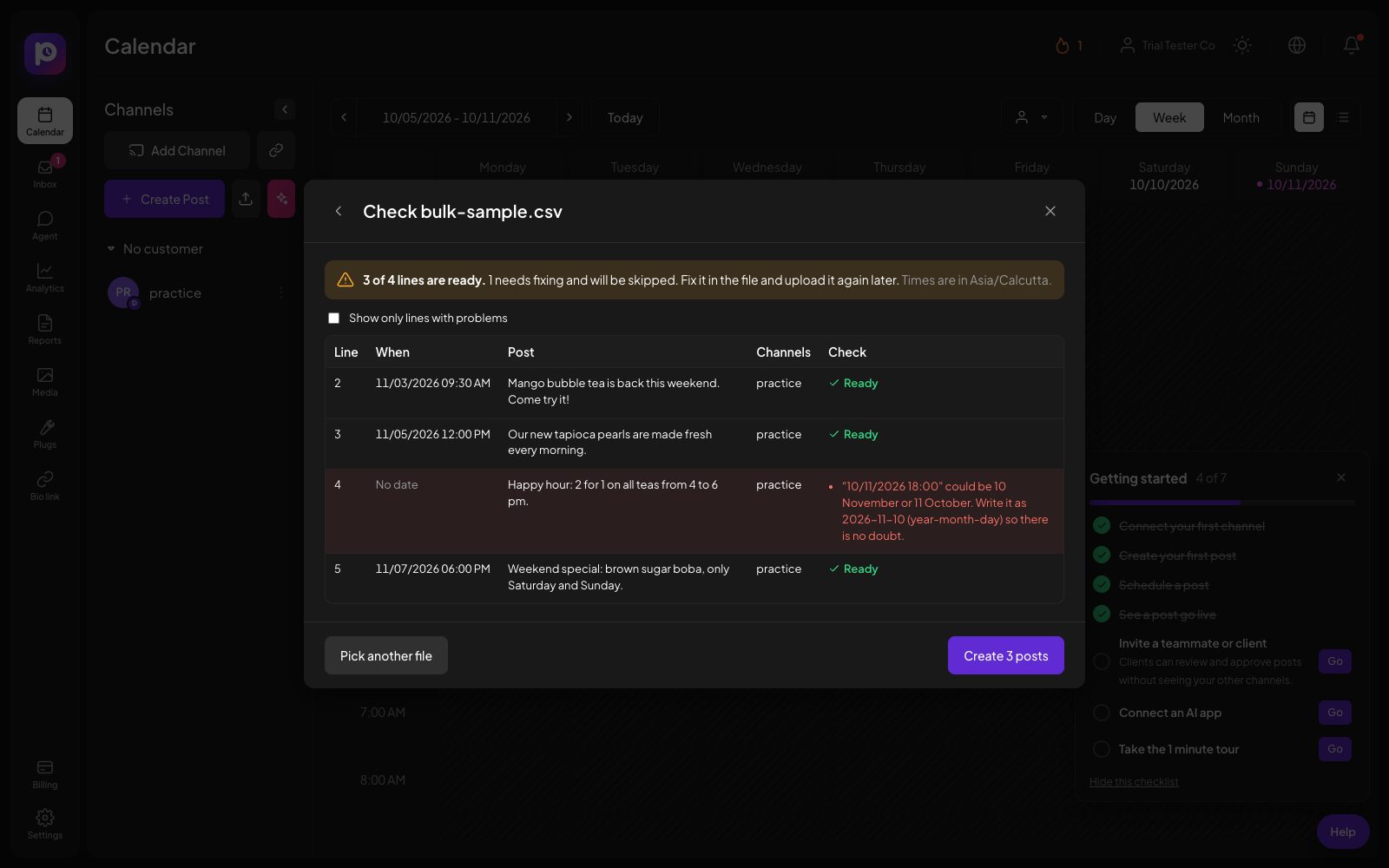
Postozo reads every line and shows which ones are ready and which need a fix, with the reason. Nothing is saved yet.
Create the posts
Press the button and the good lines become posts on your calendar. Lines with problems are left out, so fix them and upload again.
Example: a month of posts for a gym
A gym plans its October in Google Sheets: 3 posts a week for Instagram, Facebook and Google Business Profile, each with a picture link from its website. The marketer downloads the sheet as CSV and uploads it. The check finds 2 problems: 1 date was typed as 10/03/2026, which could mean 10 March or 3 October, and 1 Instagram line has no picture. She fixes both in the sheet, uploads again, and 13 posts land on the calendar in under a minute.
The columns, one by one
date: the day and time, like 2026-11-03 09:30 or 2026-11-03 9:30 PM, in the time zone of your browser. Times in the past and dates more than 2 years ahead are refused. text: the post. Line breaks inside a cell are kept. channels: channel names separated by |, for example Acme Instagram|Acme Facebook. A line with channels goes only to those; a line without uses the defaults you picked. media_url: links to up to 10 pictures or videos, separated by |. The link must open the file itself. tags: tag names separated by |. first_comment: posted as the first comment or a reply, on networks that allow it.
What the check catches
Before anything is created, each line is checked like a post in the editor would be: the date and time, that every channel exists, that there is text or a picture, and each network's own rules with the channel's saved default settings, such as Instagram needing a picture or the character limit on X. You see every line with its result and can show only the lines with problems. Nothing is saved until you press the button.
Dates that could be read 2 ways are refused instead of guessed. A daylight saving change is handled for you, so a post set for 09:30 goes out at 09:30 local time on both sides of the change.
Why a file never creates a post twice
Networks and servers sometimes fail half way. Postozo marks each line as done in the same step that creates its post, so if the import is interrupted and starts again, lines already made are skipped. This is the same rule the publishing engine follows: a post is never sent twice. When the import finishes you get 1 notification with how many posts were made and how many lines need a fix.
Limits and rules
| Lines per file | 500 |
| File size | 1 MB |
| Separators | Comma, semicolon or tab, found by itself |
| Pictures or videos per line | Up to 10, by link |
| Dates | 2026-11-03 09:30 in your time zone, or ISO with an offset; not in the past, not more than 2 years ahead |
| Modes | Schedule or Save as drafts |
A small sample file
The first line holds the column names. Each next line is 1 post:
date,text,channels,media_url,tags,first_comment
2026-11-03 09:30,"New seeded rye, warm from 8 am.",Bakery Instagram|Bakery Facebook,https://example.com/rye.jpg,Bread,Order in store or online.
2026-11-05 12:00,10% off all loaves before noon.,Bakery Google,,Offers,
2026-11-07 18:00,We are hiring a morning baker.,Bakery LinkedIn,,Hiring,
Text with a comma goes inside double quotes. Columns can be in any order, and you can leave out columns you do not use.
Tips to get more from it
- Keep 1 tab in your sheet for each month, and export only the tab you upload.
- Put picture links that open the image itself, ending in .jpg or .png, not a web page that shows the image.
- Use Save as drafts the first time, look at 2 or 3 posts on the calendar, then upload again with Schedule.
Words on this page, explained
| CSV | A spreadsheet saved as plain text, with a separator between the cells. |
| Separator | The character between cells: a comma, a semicolon or a tab. |
| Default channels | The channels for lines that have no channels column. |
Mistakes to avoid
- Writing dates with slashes. 03/05/2026 is refused because it could mean 2 different days.
- Linking to a web page instead of the picture itself. The link has to open the image or video directly.
- Using channel names that differ from the names in Postozo. Copy them from the channel list, or leave the column out and pick defaults.
Who it is for
- Agencies move a client's monthly plan from a spreadsheet into the calendar in 1 step. See Agencies.
- Marketing teams import a campaign that was planned and approved in a shared sheet. See Marketing teams.
- Small businesses plan a season at once instead of post by post. See Small business.
How other tools handle bulk upload (CSV)
Of the 12 social media tools we compare, 9 list bulk upload (CSV) on their own pricing, feature or help pages:
- Hootsuite: included
- Sprout Social: CSV bulk scheduling (up to 350 posts) is on Professional and Advanced.
- Metricool: included
- SocialPilot: Premium and Ultimate only.
- Publer: Up to 500 posts at once, including CSV.
- Sendible: included
- Vista Social: included
- Planable: CSV import of posts.
- Agorapulse: CSV bulk scheduling of up to 200 posts on Advanced and up.
Not confirmed on their own pages: Postiz, Buffer and Later.
Plans and limits
Bulk upload is in every plan. The posts it creates count like any other post, and every plan has unlimited posts. See Pricing for every limit.
| Limit | Standard | Team | Pro | Ultimate |
|---|---|---|---|---|
| Bulk upload (CSV) | Yes | Yes | Yes | Yes |
| Lines per file | 500 | 500 | 500 | 500 |
| Posts | Unlimited | Unlimited | Unlimited | Unlimited |
Works with these channels
Bulk upload works on every connected channel. These are the ones people use it with most:
See all channels, or compare Postozo with other tools on the compare page.
Questions
Which columns can I use?
date, text, channels, media_url, tags and first_comment. Only date and either text or media_url are required. Channel and tag names are separated by the | character.
How should I write dates?
Like 2026-11-03 09:30, in your own time zone, or 9:30 PM for the time. A date with an offset, like 2026-11-03T09:30:00+05:30, is kept as it is.
Why was my date refused?
A date like 03/05/2026 could be 3 May or 5 March, so Postozo refuses it rather than guess. Write it as 2026-05-03 instead.
Can I upload the same file twice?
Postozo warns about the same post, time and channels twice in 1 file. Upload a fixed file with only the lines that failed, so nothing is created twice.
Can I bulk schedule Instagram posts?
Yes. Add a picture or video link on each Instagram line, because Instagram needs at least 1. Postozo checks this before it creates anything.
Does Excel work?
Yes. Use File, Save as, CSV. Postozo reads files separated by commas, semicolons or tabs, so regional versions of Excel work too.
What happens to posts that need approval?
They are created and wait for approval like posts made in the editor. You get 1 summary instead of a message per post.
Related features
Calendar
See every scheduled, published and draft post in 1 place. Switch between day, week, month and list, and drag a post to move it.
Read morePost editor
The post editor sends 1 text to all the channels you pick. Change the text, pictures or settings for a single channel without touching the others.
Read moreMedia library
Keep every picture and video in 1 library. Add alt text, find files fast, make pictures with AI, and let Postozo check each network's size rules before a post goes out.
Read moreClient approval
Turn on approval for a customer and every post for them waits for a yes. Clients approve, ask for changes or comment from a simple review link.
Read moreStart planning your posts today
Create your account and publish your first post in 5 minutes.
Create your free account