 Postozo
Answer comments, mentions and reviews from 1 inbox
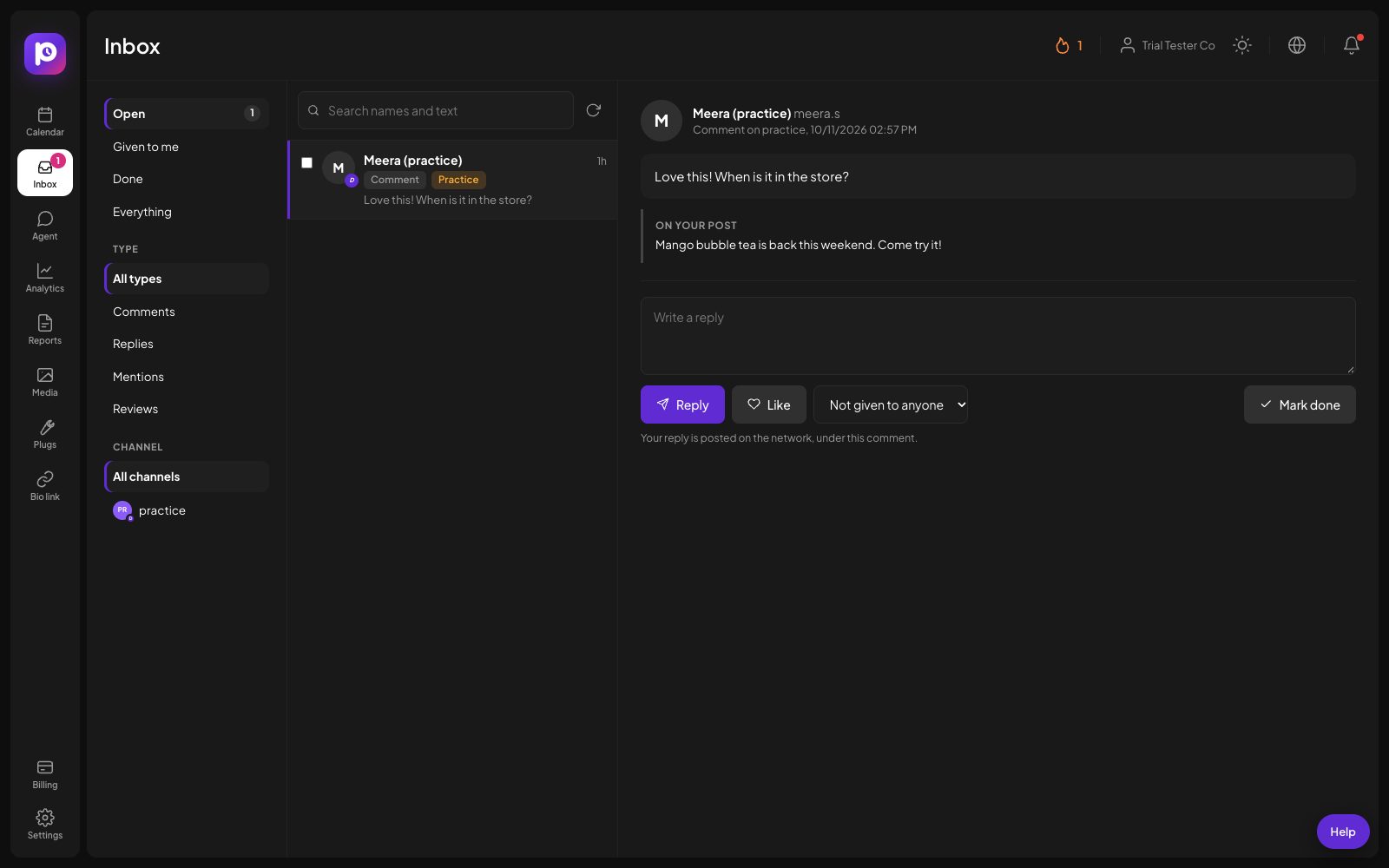
Comments, replies, mentions and Google reviews from your channels land in 1 list. Reply, like, give an item to a teammate or mark it done, without opening each network.
What you can do
8 networks in 1 list
Facebook Pages, Instagram, Threads, YouTube, LinkedIn Pages, Google Business Profile reviews, Bluesky and Mastodon.
Reply where it happened
Your answer is posted on the network, under the comment or the review, from the channel that received it.
Give it to a teammate
Assign an item to someone on the team. They find it under Given to me and get a message on their phone.
Open and done
Every item starts open. Mark it done when it is handled, or tick many and close them in 1 step.
See the post it is on
Each comment shows the post it belongs to, so you answer with the full picture.
Low reviews right away
A new Google review of 3 stars or less sends you an email and a push message at once.
Manage comments and reviews in 4 steps
Use the channels you have
The inbox reads the channels you already post to. There is nothing extra to switch on. A Facebook Page or Threads account connected before October 2026 may need to be connected again once, so Postozo is allowed to read comments.
Let it fill
Postozo looks for new items about every 10 minutes, and every 30 minutes for YouTube and Google reviews. The first look fills the inbox quietly, so old comments do not flood you with notifications.
Answer, assign or close
Open an item, write a reply and send it. Like it where the network allows. Give it to a teammate, or mark it done.
Keep it at zero
Use the Open filter as your to-do list. The number next to Inbox in the menu shows how many items are still open.
Example: a cafe on a busy Saturday
A cafe posts its weekend menu to Instagram, Facebook and its Google Business Profile. By noon there are 14 new comments and 2 new Google reviews. The owner opens the inbox on her phone, answers the 3 questions about opening hours, and likes the compliments on Facebook. She gives the 2 star review to the manager, who gets a push message and replies with an apology and an invitation to come back. The rest she ticks and marks done in 1 step.
How the inbox stays quiet but complete
The first time Postozo reads a channel, it fills the inbox with the recent comments it finds and sends no notifications, so you start with a full list instead of 50 alerts. After that, new items count as new: you get 1 notification per channel with the number of new comments, and an email summary at most once an hour if you want email. The only item that interrupts you straight away is a new Google review of 3 stars or less, which sends an email and a push message to your phone.
Items you answer stay in the list with your reply under them, so the next person sees what was said. Marking an item done does not delete anything on the network. It only moves the item out of the Open view.
Working as a team
Owners, admins and editors can use the inbox. Each item can be given to 1 person, who finds it under Given to me and gets a push message on the devices where they turned notifications on. The Open count in the menu is for the whole workspace, so a team can see at a glance whether anything is waiting.
Agencies that group channels by customer can filter the inbox by channel to work through 1 client at a time. Client members never see the inbox: it is the agency's job to answer for them, and the client keeps the normal review link for approving posts.
When a network stops answering
If a network refuses a request, for example because a password changed or a permission was removed, Postozo waits longer before it tries that channel again, up to 6 hours between tries. That way a broken connection does not use up your daily limit with the network. Connect the channel again from the channel menu and the inbox picks up where it stopped.
Network by network
What each network sends to the inbox, how often Postozo looks, and the longest reply it accepts. Read from the same code that runs the inbox.
| Network | What comes in | Checked every | Longest reply | Like |
|---|---|---|---|---|
| comments and replies | 10 minutes | 8,000 characters | Yes | |
| comments and replies | 10 minutes | 2,200 characters | No | |
| comments and replies | 10 minutes | 1,250 characters | No | |
| Threads | replies | 10 minutes | 500 characters | No |
| YouTube | comments and replies | 30 minutes | 10,000 characters | No |
| Google Business Profile | reviews | 30 minutes | 4,096 characters | No |
| Bluesky | replies and mentions | 10 minutes | 300 characters | Yes |
| Mastodon | replies and mentions | 10 minutes | 500 characters | Yes |
Limits and rules
| Networks | Facebook Pages, Instagram, Threads, YouTube, LinkedIn Pages, Google Business Profile, Bluesky and Mastodon |
| How often it looks | About every 10 minutes; every 30 minutes for YouTube and Google reviews |
| Which posts | Facebook and Instagram: the 15 newest posts. Threads and LinkedIn: the 10 newest posts you published with Postozo in the last 30 days. YouTube: every video. Bluesky and Mastodon: your notifications |
| Direct messages | Not included |
| Who can open it | Owners, admins and editors. Not clients |
A 10 minute inbox routine
Twice a day, open the inbox on the Open filter. Answer questions first, because they often lose you a customer if they wait. Give anything about money, refunds or complaints to the person who can decide. Like or briefly thank the compliments. Tick the rest and mark them done together. If you work for clients, go channel by channel so each client gets your full attention for a few minutes.
Tips to get more from it
- Check the Open filter at 2 fixed times a day instead of reacting to every notification.
- Give reviews of 3 stars or less to 1 person who can fix the problem, so every unhappy customer hears from someone who can help.
- Write each reply as if the whole page will read it. Comments and review answers are public.
Words on this page, explained
| Comment | A response under a post. |
| Reply | A response to a comment, or to your post on Threads, Bluesky or Mastodon. |
| Mention | A post where someone tagged your account. |
| Review | A rating with text on your Google Business Profile. |
| Open and done | Open items still need someone; done items are handled. |
Mistakes to avoid
- Answering the same Google review in Google and in Postozo. Google keeps 1 answer per review, so the last one replaces the first.
- Leaving items open after you answered them in the network's own app. Mark them done so the Open count stays true.
- Expecting direct messages here. Use each network's own app for private messages.
Who it is for
- Agencies answer for every client from 1 list, filtered by channel, and clients never see the inbox. See Agencies.
- Small businesses answer reviews and questions the same day, even from a phone. See Small business.
- Marketing teams split the work: each person handles what is given to them. See Marketing teams.
How other tools handle social inbox
Of the 12 social media tools we compare, 11 list social inbox on their own pricing, feature or help pages:
- Buffer: Community inbox for replying to comments. We found no DM inbox on the pricing page.
- Hootsuite: included
- Later: Instagram, Facebook and TikTok conversations on Growth and Scale.
- Sprout Social: included
- Metricool: included
- SocialPilot: Standard plan and up.
- Publer: Reply to comments on published posts from the calendar. We found no unified DM inbox.
- Sendible: Replies to comments are listed for Facebook, Instagram and LinkedIn.
- Vista Social: included
- Planable: Paid add-on.
- Agorapulse: included
Not offered: Postiz.
Plans and limits
The inbox is in every plan, for every channel on a network it supports. Giving items to teammates needs team members, which start with the Team plan. See Pricing for every limit.
| Limit | Standard | Team | Pro | Ultimate |
|---|---|---|---|---|
| Social inbox | Yes | Yes | Yes | Yes |
| Give items to teammates | No | Yes | Yes | Yes |
| Channels | 5 | 10 | 30 | 100 |
Works with these channels
Social inbox works on every connected channel. These are the ones people use it with most:
See all channels, or compare Postozo with other tools on the compare page.
Questions
Which networks does the inbox cover?
Facebook Pages, Instagram (both ways of connecting it), Threads, YouTube, LinkedIn Pages, Google Business Profile reviews, Bluesky and Mastodon.
Does the inbox show direct messages?
No. It shows comments, replies, mentions and reviews. Direct messages stay in each network's own app.
Can clients see the inbox?
No. Client members cannot open it, because the agency answers comments and reviews for them.
How fast do new comments show up?
Usually within about 10 minutes. YouTube comments and Google reviews are checked every 30 minutes, to stay inside the daily limits those networks set.
What is a social media inbox?
One place where comments, mentions and reviews from all your accounts arrive, so you can answer them without opening each app.
Can I reply to Google reviews from Postozo?
Yes. Reviews from your Business Profile locations come in with their stars, and your reply is posted as the business answer.
Can I like comments from the inbox?
On Facebook Pages, Bluesky and Mastodon, yes. Instagram, Threads, YouTube, LinkedIn and Google do not let apps like comments, so the button is hidden there.
Does an answer I wrote in the network's own app show up?
Your own answers are not listed as new items. For Google reviews, a review you already answered anywhere comes in as done.
Related features
Analytics
Follow results for each channel and each post, count clicks on your links, and find the best time to post.
Read moreTeam and roles
Invite your team and clients to 1 workspace. Each role sees and does only what it should.
Read moreMobile app
Install Postozo from the browser on Android, iPhone, Windows or Mac. It opens full screen like an app and sends a push message when a post fails, needs approval or a client connects an account.
Read moreClient reports
Pick a customer and a period. Postozo puts their posts and each network's numbers on 1 page you can share as a link, save as a PDF, or have emailed every week or month.
Read moreStart planning your posts today
Create your account and publish your first post in 5 minutes.
Create your free account