 Postozo
Share any web page to your social channels in 2 clicks
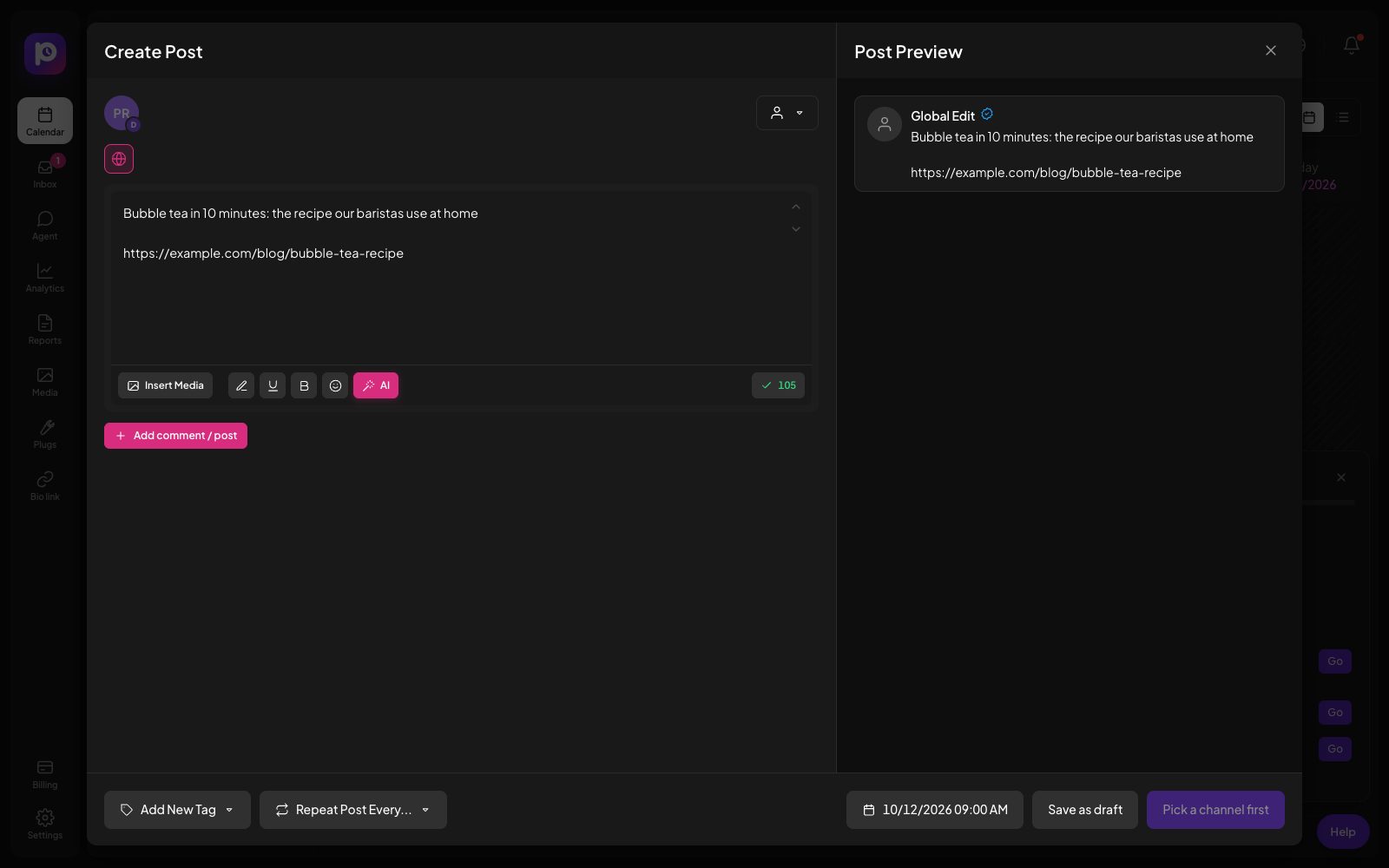
Found something worth sharing? Click the Postozo button or press Alt+Shift+P. The post editor opens with the link, the text you picked and the picture, ready to schedule.
What you can do
The page, the text or the picture
Share the page you are on, the text you selected, a link or a picture, from the toolbar or the right-click menu.
Opens the full editor
The post editor opens in a small window with everything filled in, so you pick channels and a time as usual.
Keyboard shortcut
Alt+Shift+P shares the current page without touching the mouse.
No password stored
The extension uses your normal Postozo sign-in and keeps no password or key.
Pictures through the safe path
Pictures are fetched by Postozo through the same safe path as any media link.
White label ready
Point it at your agency's own Postozo address in Options.
Install the browser extension in 4 steps
Download the extension
Get the ZIP file from this page and unzip it into a folder you keep.
Load it into Chrome or Edge
Open chrome://extensions or edge://extensions, turn on Developer mode, press Load unpacked and pick the folder.
Pin it
Pin the Postozo button to the toolbar so it is always 1 click away.
Share
On any page, click the button, press Alt+Shift+P, or right-click a picture, link or selected text and pick Share with Postozo.
Example: a weekly roundup for a LinkedIn Page
A content marketer reads industry news every morning. When she finds a good article, she selects the key sentence and presses Alt+Shift+P. The editor opens with the sentence, the link and the article picture. She adds 1 line of her own view, picks the company LinkedIn Page and the next free slot, and goes back to reading. By Friday the week has 5 posts queued without a single copy and paste.
What the extension can and cannot do
The extension asks Chrome for 4 permissions: activeTab to read the page you are on when you press the button, contextMenus for the right-click menu, scripting to pick up the text you selected, and storage to remember your server address. It does not ask for access to every website, does not run in the background on other pages, and sends nothing until you share. The share opens app.postozo.com in a small window, where your normal sign-in applies, so the extension never sees your password.
Installing from the ZIP file
Chrome and Edge let you load an extension from a folder in Developer mode. Download the ZIP below, unzip it, open the extensions page, switch on Developer mode, press Load unpacked and choose the unzipped folder. The Postozo button appears in the puzzle piece menu; pin it to keep it on the toolbar. Chrome may remind you that a developer mode extension is installed; that is normal for extensions loaded this way. When the Chrome Web Store listing is live, you can switch to it and remove the folder.
For agencies on their own address
If your clients or your team use Postozo on a white label address, open the extension Options and enter that address. Shares then open your branded app instead of app.postozo.com, and the same sign-in rules apply.
Limits and rules
| Browsers | Chrome, Edge, Brave, Opera, Vivaldi and other Chromium browsers |
| Not supported | Firefox, Safari and phone browsers |
| Permissions | activeTab, contextMenus, scripting and storage only |
| Shortcut | Alt+Shift+P (change it in chrome://extensions/shortcuts) |
| Install | ZIP file with Load unpacked until the Chrome Web Store listing is live |
What gets filled in
| You use | The post starts with |
|---|---|
| The toolbar button or Alt+Shift+P | The text you selected, or the page title, plus the page link |
| Right-click on a page | The page title and link |
| Right-click on selected text | That text and the page link |
| Right-click on a link | That link, and any text you selected |
| Right-click on a picture | The picture, added to the post and your media library, with the page title and link |
Tips to get more from it
- Select the sentence that made you want to share before you press the button. It becomes the start of your post.
- Right-click a picture and share it to use that picture instead of the page's default one.
- Use the next free slot in the editor so shared posts spread over the week instead of going out at once.
Words on this page, explained
| Extension | A small add-on for your browser. |
| Load unpacked | The Chrome and Edge way to install an extension from a folder. |
Mistakes to avoid
- Deleting the unzipped folder after loading it. Chrome runs the extension from that folder, so keep it.
- Sharing a page while signed out. Sign in to Postozo once in the same browser first.
- Expecting it to post at once. It opens the editor; you still pick the channels and time.
Who it is for
- Content teams turn reading into a queue of posts as they go. See Marketing teams.
- Creators share what inspires them with their own comment on top. See Creators.
- Agencies collect news for each client's channels without switching tabs. See Agencies.
How other tools handle browser extension
Of the 12 social media tools we compare, 9 list browser extension on their own pricing, feature or help pages:
- Buffer: Every plan.
- Later: Saves pictures from any web page to the media library.
- Sprout Social: Compose extension for Chrome, on every plan.
- Metricool: Free Chrome extension.
- SocialPilot: Every plan.
- Publer: included
- Sendible: Chrome extension.
- Vista Social: included
- Agorapulse: Chrome extension that sends pages to the publisher.
Not confirmed on their own pages: Postiz, Hootsuite and Planable.
Plans and limits
The browser extension is free and works with every plan. See Pricing for every limit.
| Limit | Standard | Team | Pro | Ultimate |
|---|---|---|---|---|
| Browser extension | Yes | Yes | Yes | Yes |
| Share pages, text, links and pictures | Yes | Yes | Yes | Yes |
Download the extension
Download postozo-extension.zip
Version 1.0.0, for Chrome, Edge and other Chromium browsers. Unzip it, open chrome://extensions, turn on Developer mode, press Load unpacked and pick the folder.
Works with these channels
Browser extension works on every connected channel. These are the ones people use it with most:
See all channels, or compare Postozo with other tools on the compare page.
Questions
Which browsers does it work in?
Chrome, Edge, Brave, Opera, Vivaldi and other browsers built on Chromium. Firefox and Safari are not supported.
Is it in the Chrome Web Store?
Not yet. Until the listing is live, install it from the ZIP file on this page with Load unpacked. It is the same extension.
What can the extension see?
Only the page you share, at the moment you share it. It does not read other pages or your browsing.
Does it post by itself?
No. It opens the post editor. Nothing is scheduled until you pick channels and press the button.
How do I share a web page to social media in 1 click?
Install the Postozo browser extension, then click its button on any page. The post editor opens with the link and title filled in.
Does the extension work on a phone?
No. Phone browsers do not run extensions. On a phone, use the share menu or copy the link into the post editor.
How do I update the extension?
Download the newest ZIP from this page, replace the old folder, and press the reload arrow on the extension card in chrome://extensions.
Related features
Post editor
The post editor sends 1 text to all the channels you pick. Change the text, pictures or settings for a single channel without touching the others.
Read moreCalendar
See every scheduled, published and draft post in 1 place. Switch between day, week, month and list, and drag a post to move it.
Read moreShort links
Shorten the links in your posts and see how many people clicked, with no extra tool.
Read moreMedia library
Keep every picture and video in 1 library. Add alt text, find files fast, make pictures with AI, and let Postozo check each network's size rules before a post goes out.
Read moreStart planning your posts today
Create your account and publish your first post in 5 minutes.
Create your free account