 Postozo
A link in bio page that shows your latest posts
Make a small page with all your links for your Instagram, TikTok or X bio. It shows your latest posts with pictures and counts views and clicks, without tracking scripts.
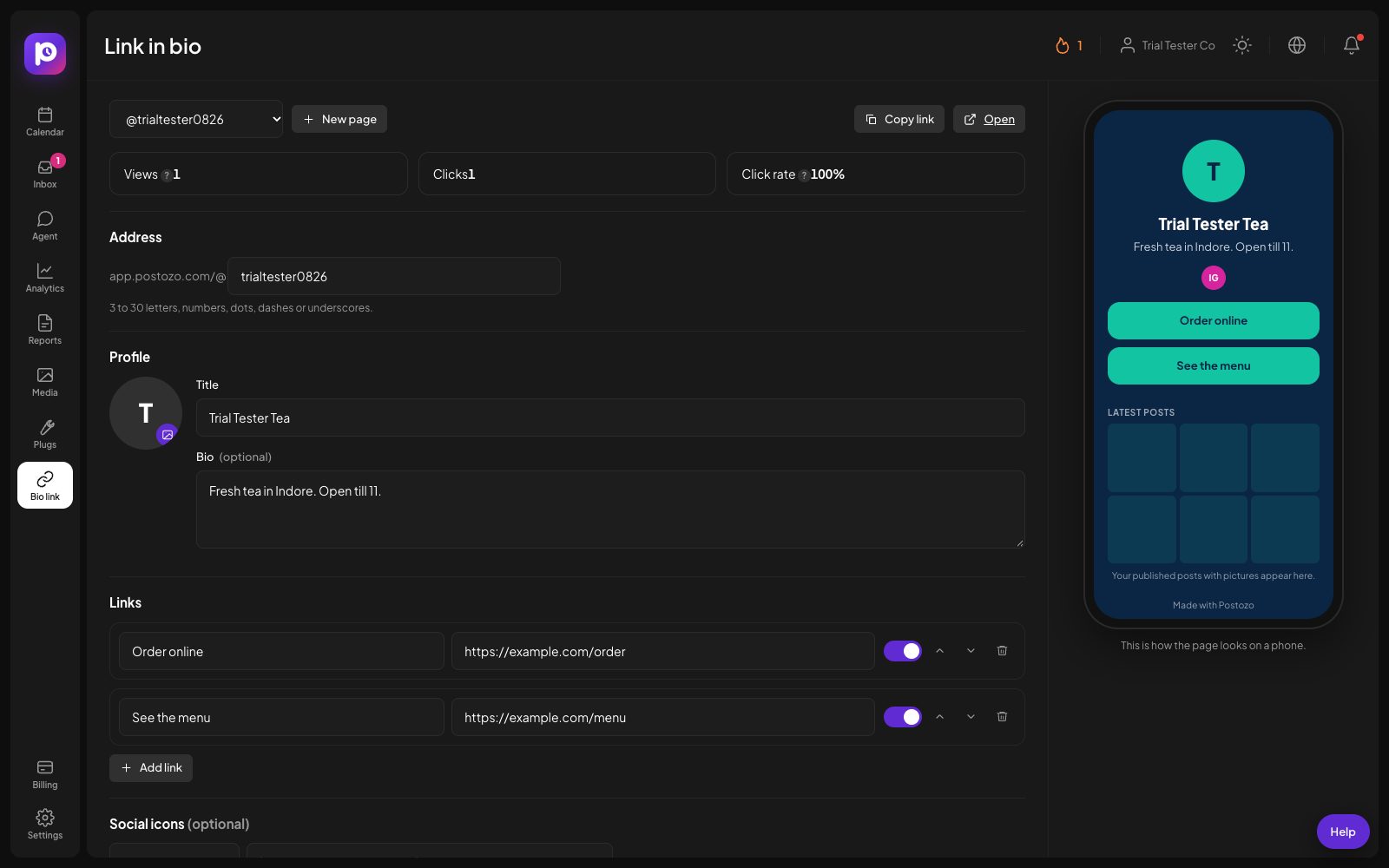
What you can do
Your own address
A page at app.postozo.com/@yourname, with your picture, title and a short bio.
Links you can sort
Add, move and hide links, each with its own click count.
Latest posts grid
Up to 12 of your published posts with pictures. Each one opens the first link in its text, or the post itself.
6 themes or your colours
Midnight, Snow, Ocean, Berry, Forest and Sky, or your own colours, button style and corners.
Real views and clicks
Counted per day. Bots, link previews and headless browsers are not counted.
Fast and private
The page has no scripts and no tracking cookies, so it opens fast on phones.
Make a link in bio page in 4 steps
Pick your address
Open Bio link and choose an address of 3 to 30 letters, numbers, dots, dashes or underscores.
Add your details
Pick a picture from your media library, write a title and a short bio, and add social icons.
Add links and the grid
Add the links you want, in the order you want. Turn on the latest posts grid to show what you published.
Publish and paste
Turn the page on, copy the link and paste it in your profile bio. Views and clicks are counted from the first visit.
Example: a bakery's Instagram bio
A bakery's Instagram bio used to point only to its website. Now it points to app.postozo.com/@sunrisebakery, with buttons for Order online, Today's menu, Directions and WhatsApp, and a grid of the last 12 posts. When a customer taps the photo of the new sourdough, they land on the order page linked in that post. After a month, the owner sees that Order online gets 4 times more clicks than Directions, and moves it to the top.
How the posts grid picks its links
The grid shows up to 12 of your newest published posts that have a picture. Each picture links to the first web address in that post's text, so a post about a product sends people to the product page. A post without a link in its text opens the post on the network instead. Agencies can tie a page to a customer, so the grid shows only that client's posts and never another client's.
How views and clicks are counted
A view is counted when a person opens the page, and a click when they tap a link. Both are counted per day. Visits from bots, link preview crawlers (the ones that draw a preview card when someone pastes your link into a chat) and headless browsers are left out, so the numbers reflect people. Clicks pass through a short hop on the same address, which only ever sends people to a link saved on your page, so it cannot be used to send visitors somewhere else.
Built to be fast and safe
The page is drawn on our server and has no scripts at all. It loads fast on slow phones, works without cookies, and follows a strict security policy. Every page has a small report link at the bottom, so anyone can tell us about a page that breaks the rules.
Limits and rules
| Address | app.postozo.com/@name, 3 to 30 letters, numbers, dots, dashes or underscores |
| Posts grid | Up to 12 published posts with pictures |
| Themes | Midnight, Snow, Ocean, Berry, Forest and Sky, or your own colours |
| Counting | Views and clicks per day; bots and link previews not counted |
| Scripts and cookies | None on the page |
What to put on your page
| If you are | Links that work |
|---|---|
| A restaurant or cafe | Order online, Today's menu, Book a table, Directions |
| A shop | New arrivals, Sale, WhatsApp us, Store hours |
| A clinic or salon | Book an appointment, Prices, Call now, Reviews |
| A creator | Latest video, Newsletter, Shop, Work with me |
| An agency | Case studies, Book a call, Services, Contact |
Tips to get more from it
- Put the 1 thing you want most people to do at the top, and keep the list under 6 links.
- Use the posts grid if your posts already link to products or articles. Each picture then sends people to the right page.
- Check the clicks after 2 weeks and move the links nobody uses to the bottom or hide them.
Words on this page, explained
| Link in bio | A small page with many links, for the 1 link a profile bio allows. |
| Handle | The name in your page address, after the @. |
| Theme | The colours and look of your page. |
Mistakes to avoid
- Pasting the page link in your bio before turning the page on. Check the page in a private window first.
- Adding every link you have. Fewer links get more clicks each.
- Changing your address after printing it on flyers. Pick a short address you will keep.
Who it is for
- Creators send followers to their latest video, shop and newsletter from 1 link. See Creators.
- Small businesses turn an Instagram bio into a menu of order, book and call buttons. See Small business.
- Agencies make a page per client and show only that client's posts in the grid. See Agencies.
How other tools handle link in bio page
Of the 12 social media tools we compare, 7 list link in bio page on their own pricing, feature or help pages:
- Buffer: Start Page, on every plan including Free.
- Hootsuite: Through the OneClick.bio app, free with Hootsuite Enterprise only.
- Later: Link in Bio on every plan.
- Metricool: SmartLinks, on paid plans.
- Publer: Through Linkie, on every plan including Free.
- Vista Social: Vista Page, on every plan.
- Agorapulse: PulseLink in bio, Professional and up.
Not confirmed on their own pages: Postiz, Sprout Social, SocialPilot, Sendible and Planable.
Plans and limits
Link in bio pages are in every plan. See Pricing for every limit.
| Limit | Standard | Team | Pro | Ultimate |
|---|---|---|---|---|
| Link in bio pages | Yes | Yes | Yes | Yes |
| Latest posts grid | Yes | Yes | Yes | Yes |
| Views and clicks | Yes | Yes | Yes | Yes |
Works with these channels
Link in bio works on every connected channel. These are the ones people use it with most:
See all channels, or compare Postozo with other tools on the compare page.
Questions
Where does my page live?
At app.postozo.com/@yourname. You pick the name when you create the page.
Does the page track visitors?
It counts views and clicks per day, without scripts or tracking cookies. Bots and link previews are not counted.
Can I hide the page without deleting it?
Yes. Turn it off and it stops showing; turn it on again later with the same address.
Can I keep the page out of Google?
Yes. Turn on Hide from search engines. People with the link can still open it.
What is a link in bio?
A small web page with several links, made for the 1 link Instagram, TikTok and other networks allow in a profile bio.
Can agencies make pages for clients?
Yes. Tie a page to a customer and its posts grid shows only that client's posts. Client members cannot edit pages, the agency does.
Are link in bio clicks in reports?
Yes. Client reports have a Link in bio section with the views and clicks of your pages.
Related features
Client reports
Pick a customer and a period. Postozo puts their posts and each network's numbers on 1 page you can share as a link, save as a PDF, or have emailed every week or month.
Read moreAnalytics
Follow results for each channel and each post, count clicks on your links, and find the best time to post.
Read moreShort links
Shorten the links in your posts and see how many people clicked, with no extra tool.
Read moreMedia library
Keep every picture and video in 1 library. Add alt text, find files fast, make pictures with AI, and let Postozo check each network's size rules before a post goes out.
Read moreStart planning your posts today
Create your account and publish your first post in 5 minutes.
Create your free account