 Postozo
A social media approval workflow that clients actually use
A clear social media approval process stops posts going out with a mistake, and stops you chasing people on chat apps. Here is a simple 5 step workflow and how to run it in Postozo.
The 5 step social media approval process
Write the post
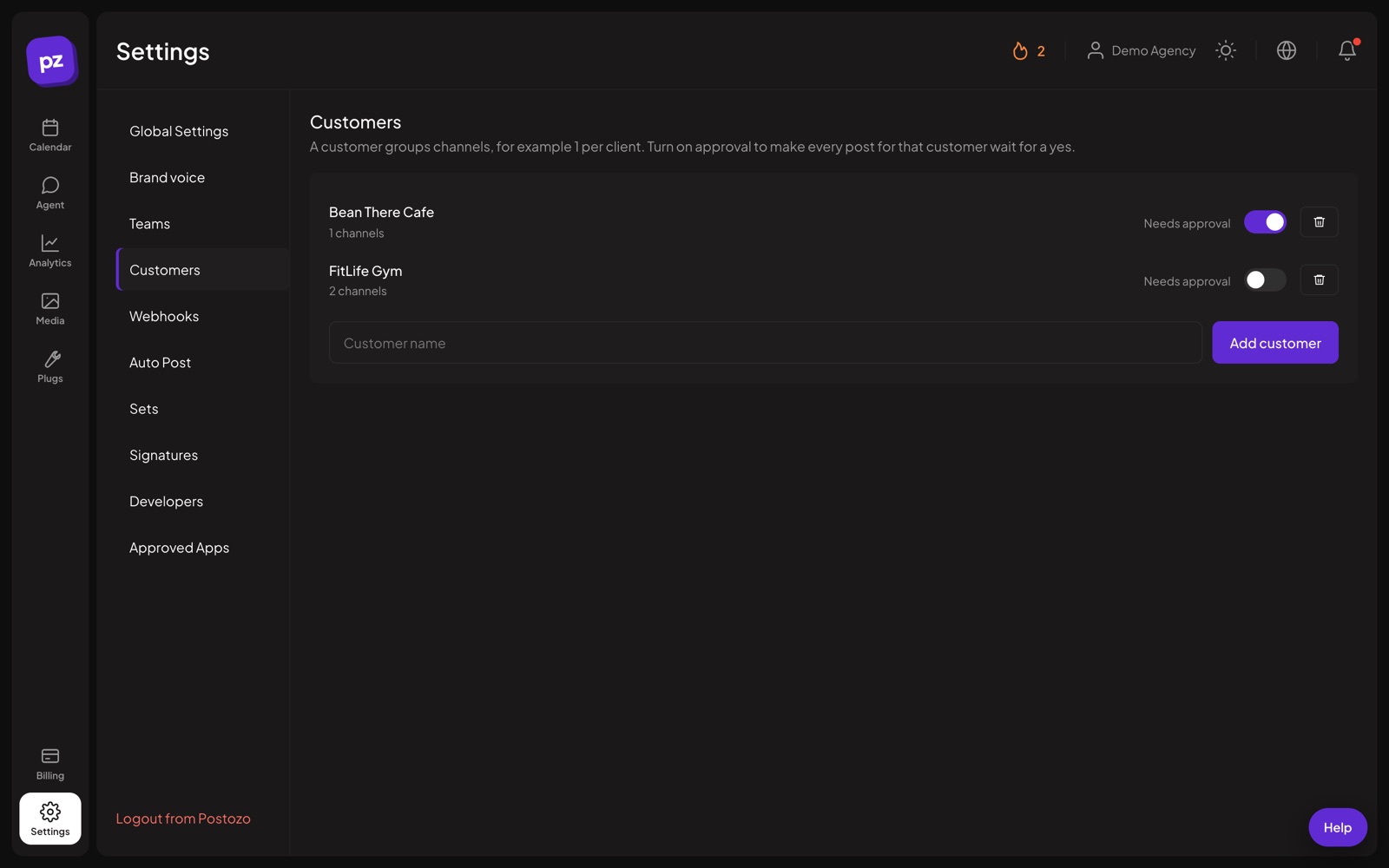
An editor writes the post and picks the channels, which sit under a customer (client or brand).
Send it for review
If approval is on for that customer, the post waits. Share a review link, or let the Client member see it in the app.
Approve, change or comment
The reviewer approves, requests changes or leaves a comment. Every answer is saved with the post.
Fix and resend
On a change request, the editor updates the post. A changed post always goes back for a new yes.
Publish on time
Approved posts go out at their set time. You choose what happens if nobody answers in time.
Who does what
| Role | Can do |
|---|---|
| Owner and Admin | Connect channels, manage the team, approve posts, fix failed posts. |
| Editor | Write and schedule posts. Posts that need approval wait for an admin or the client. |
| Client | Sees only their own brand. Approves, requests changes and comments. |
| Reviewer with a link | No account needed. Sees a preview of 1 post and answers. |
Team members and Client members need the Team plan or higher. Review links work on every plan. See team and roles.
Decide what happens when nobody answers
This is the part most approval workflows forget. In Postozo you choose it per customer:
- Keep waiting. The post does not go out until someone approves it. Good for legal, health and finance clients.
- Publish anyway. The post goes out at its time. Good for clients who want to see posts but trust you.
- Move it back to drafts. The post is taken off the schedule so you can decide later.
3 example approval setups
| Client type | Approval | If nobody answers |
|---|---|---|
| Law firm or clinic | On, every post | Keep waiting |
| Shop or restaurant that trusts you | Off | Not needed |
| Busy brand that wants to see posts | On | Publish anyway at the set time |
These are starting points. Agree the rule with each client at the start, write it down, and change it any time in the customer settings if the client's needs change.
Approval checklist for reviewers
- Are the facts right: prices, dates, names and links?
- Is the picture or video the right one, and allowed to be used?
- Does it follow the brand voice and the words to avoid?
- Is it going to the right channels at the right time?
- Does it follow the rules of the industry, for example no health promises?
Tips for a smooth approval process
- Agree the timeout rule with each client at the start. It avoids arguments later.
- Send posts for review 2 to 3 working days ahead.
- Keep feedback in comments on the post, not in email, so the history stays in 1 place.
- Use 1 approver per client where you can. 3 approvers means 3 opinions.
- Batch reviews: send a week of posts on the same day, so the client answers once.
Connect approvals to your own tools
Postozo sends signed webhooks when approval is requested, when a post is approved and when changes are requested. Send them to n8n, Make or Zapier to post in Slack or update a task. See API and MCP.
Approval workflow with your brand
On Pro and Ultimate, clients can see your agency's name, logo and colour on review pages and emails instead of Postozo. See white label social media management. For the full feature list, see client approval and Postozo for agencies.
Related guides
White label social media management
White label social media management on Pro and Ultimate: your agency name, logo and colour on client review pages, the client app and emails, plus a custom domain.
Read moreSocial media calendar template
Download a free social media calendar template as a CSV file. See what each column is for, how to fill a week, and when to move to a scheduler.
Read morePost to multiple Facebook Pages
Post and schedule to multiple Facebook Pages at once: connect every Page in 1 sign-in, write once, change text per Page and publish at the same time.
Read moreQuestions
What is a social media approval workflow?
The steps a post goes through before it is published: write, review, approve or change, then publish. It makes sure the right person says yes first.
Does my client need an account to approve posts?
No. They can approve from a review link. You can also invite them as a Client member if they want to log in.
What happens if I edit a post after it was approved?
It goes back to waiting for approval, so the client always approves the final version.
Can editors approve their own posts?
No. Editors write and schedule. Owners, admins or the client approve.
Can different clients have different rules?
Yes. Approval and the timeout rule are set per customer.
Which plans include approvals?
Review links and approval rules are on every plan. Client members and team roles need the Team plan or higher.
Start planning your posts today
Create your account and publish your first post in 5 minutes.
Create your free account